Best Tips for a Clean and Efficient Workspace 2024
Best tips for a clean and efficient work space matter more than you might think. A tidy and organized workspace isn’t just about aesthetics—it plays a crucial role in boosting productivity and reducing stress. Picture this: stepping into your office each morning, your desk is spotlessly clean, digital files are neatly organized, and there’s not a dust bunny in sight. Suddenly, the chaos of deadlines and meetings feels much more manageable.
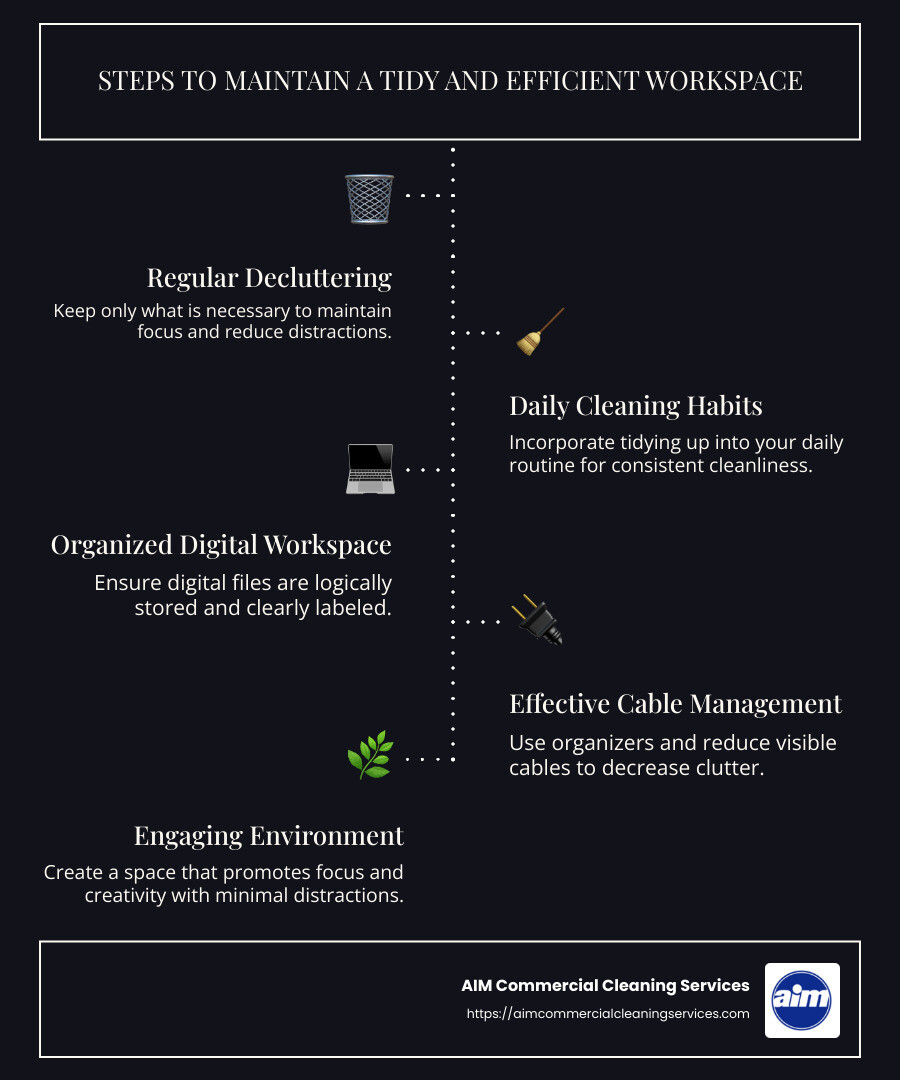
- Regular decluttering – Keep only what is necessary.
- Daily cleaning habits – Make tidiness a part of your routine.
- Organized digital workspace – Files stored logically and labeled clearly.
- Effective cable management – Reduce visible wire clutter.
- Engaging environment – Promote focus and creativity with minimal distractions.
A well-maintained workspace not only improves productivity by keeping distractions at bay but also fosters a sense of calm. In fact, a clean environment acts as a catalyst for creativity and clear thinking. Imagine being able to focus more because your mind isn’t sidetracked by a messy desk or a cluttered desktop. This clarity leads to better decision-making and more efficient work.
Best Tips for a Clean and Efficient Workspace
Creating a clean and efficient workspace is more than just tidying up. It’s about creating an environment that boosts your productivity and keeps stress at bay. Let’s explore some of the best practices to achieve this.
Decluttering
Start by removing everything from your workspace. This might sound drastic, but it’s the first step toward a more organized environment. Once everything is out, assess each item. Ask yourself if it’s essential or if it can be stored elsewhere.
- Keep only what you use daily: This includes your computer, a notebook, and a pen. Everything else should find a home in drawers or storage areas.
- Use dividers and shelves: These can help you organize items efficiently. A well-organized space reduces visual clutter and makes it easier to find what you need.
Organization
An organized workspace is a productive workspace. Here’s how you can keep things orderly:
- Assign a place for everything: Items you use frequently should be within reach. Use labels if necessary to remind yourself where things belong.
- Incorporate storage solutions: Use baskets, containers, or file organizers to keep papers and supplies tidy. This helps maintain order and prevents clutter from building up.
- Use a minimalistic approach: Less is often more. Keep your desk clear of unnecessary items. This not only looks better but also helps you focus.
Daily Habits
Developing consistent daily habits is key to maintaining a clean workspace:
- Clean as you go: At the end of each day, take a few minutes to tidy up. Put away stray papers, wipe down surfaces, and make sure everything is in its place.
- Schedule regular clean-ups: Set a specific time each week to do a more thorough cleaning. This routine prevents clutter from piling up and keeps your space inviting.
- Engage in digital decluttering: Regularly organize your digital files and emails. A cluttered computer can be just as distracting as a messy desk.

A workspace that is consistently clean and organized not only improves productivity but also contributes to a healthier work environment. By following these best tips for a clean and efficient workspace, you’ll create a setting that supports your work rather than hinders it.
Next, we’ll dive into how managing your digital workspace can further improve your efficiency and productivity.
Declutter and Organize
Creating a clean and efficient workspace begins with decluttering and organizing. This process can transform your environment into a space that improves focus and productivity.
Remove Everything
Start by removing everything from your desk, shelves, and drawers. This might seem overwhelming, but it’s an essential first step. By clearing everything out, you gain a fresh perspective on what truly belongs in your workspace.
Once your space is empty, take a moment to clean all surfaces. Wipe down your desk, dust off shelves, and sanitize your computer equipment. A clean slate sets the tone for a more organized environment.
Assess Items
Now that everything is out, it’s time to assess each item. Decide what you need daily and what can be stored or discarded.
- Create three piles: Keep, archive, and junk. The “keep” pile should contain items you need frequently. The “archive” pile is for items that need to be saved but not necessarily on display. The “junk” pile is for anything you can throw away or donate.
- Be ruthless: If you haven’t used something in months, it’s probably not essential. Letting go of unnecessary items can be liberating and creates more space.
Rearrange Space
If your workspace often falls back into clutter, consider rearranging it. A strategic layout can make a big difference.
- Keep essentials within reach: Items you use often should be easily accessible. This reduces the time spent searching for things and keeps your desk clear.
- Store rarely used items: Place these in drawers or on higher shelves. This keeps them out of sight but still accessible when needed.
Dividers and Shelves
Using dividers and shelves wisely can greatly improve organization.
- Drawer dividers: These keep small items like pens, paper clips, and sticky notes organized. You’ll always know where to find what you need.
- Hanging shelves: Use these for storing binders, manuals, and other reference materials. This keeps your desk space free and organized.
- Label everything: Labels can be a lifesaver. They remind you where items belong, making it easier to maintain order.
By following these steps, you’ll create a workspace that supports your work and reduces stress. A decluttered and organized environment is key to a more productive day.
Next, we’ll explore how a daily cleaning routine can keep your workspace consistently tidy and efficient.
Daily Cleaning Routine
A daily cleaning routine is the backbone of maintaining a tidy and efficient workspace. By incorporating simple habits into your day, you can ensure that your work environment remains conducive to productivity and focus.
Clean Daily
The first step in a successful daily cleaning routine is to clean daily. This doesn’t mean undertaking a full-scale cleaning operation every day. Instead, focus on small tasks that can prevent clutter and dirt from accumulating.
- Wipe down surfaces: Use a disinfectant wipe or a damp cloth to clean your desk, keyboard, and mouse. High-touch areas should be sanitized regularly to keep germs at bay.
- Tidy up your desk: Before leaving for the day, take a few minutes to clear your desk of papers, coffee cups, and other items that have accumulated. This ensures you start each day with a clean slate.
Scheduled Cleaning
In addition to daily tasks, having a scheduled cleaning plan can help ensure that less frequent but equally important tasks are not overlooked.
- Weekly tasks: Dedicate one day a week to address tasks like dusting shelves and vacuuming the floor. This helps maintain a dust-free environment and keeps allergens at bay.
- Monthly deep clean: Schedule a more thorough cleaning once a month. This might include cleaning windows, disinfecting electronics, and organizing storage areas.
Consistent Maintenance
Consistency is key to maintaining a clean workspace. By sticking to a routine, you can prevent clutter and dirt from taking over.
- Set reminders: Use digital tools or calendar alerts to remind you of your cleaning schedule. This helps you stay on track and ensures no task is forgotten.
- Involve everyone: If you’re in a shared workspace, encourage colleagues to participate in keeping the area clean. A collective effort can make maintaining a tidy environment much easier.
- Evaluate and adjust: Regularly assess your cleaning routine to determine what’s working and what isn’t. Don’t be afraid to make changes to improve efficiency.
By integrating these habits into your daily routine, you’ll create a workspace that not only looks great but also boosts your productivity. A clean and organized environment is essential for a successful workday.
Next, we’ll dig into the importance of managing your digital workspace to further improve efficiency.
Digital Workspace Management
Managing your digital workspace is just as crucial as keeping your physical desk tidy. An organized digital environment can significantly boost your productivity and reduce stress.
Digital Organization
Start by organizing your digital files. Just like a cluttered desk, a messy computer can slow you down. Create a folder system that makes sense for your workflow. Use clear and consistent naming conventions to make files easy to find.
- Folder structure: Set up a hierarchy of folders. For example, have a main folder for each project, with subfolders for documents, images, and emails.
- Use cloud storage: Services like Google Drive or Dropbox can help you access your files from anywhere. This also helps keep your computer’s hard drive uncluttered.
File Management
Efficient file management is key to maintaining a clean digital workspace. Regularly review your files to ensure everything is in its right place.
- Delete duplicates: Use tools like Duplicate Files Fixer to find and remove duplicate files. This not only saves space but also makes it easier to find the files you need.
- Archive old files: Move files you no longer use regularly to an archive folder. This keeps your main workspace uncluttered while still making old files accessible if needed.
Minimize Digital Clutter
Digital clutter can be just as distracting as physical clutter. Keep your digital workspace streamlined to maintain focus.
- Clean your desktop: A cluttered desktop can be overwhelming. Keep only the essentials visible and organize the rest into folders.
- Uninstall unused apps: Get rid of apps and programs you no longer use. These can slow down your computer and make it harder to find the tools you need.
- Manage your inbox: Regularly delete or archive emails you don’t need. Use folders or labels to organize important emails for easy access.
By implementing these best tips for a clean and efficient workspace, you’ll create a digital environment that supports productivity and reduces stress. Next, we’ll explore how managing cables and wires can further improve your workspace efficiency.
Cable and Wire Management
Managing cables and wires is essential for maintaining a clean and efficient workspace. Tangled cords not only create visual clutter but can also be a safety hazard. Here’s how to keep them under control:
Cable Organizers
Cable organizers are a simple yet effective solution for taming unruly wires. They come in various forms, such as cable ties, clips, and sleeves. Use these tools to bundle cables together and keep them out of sight.
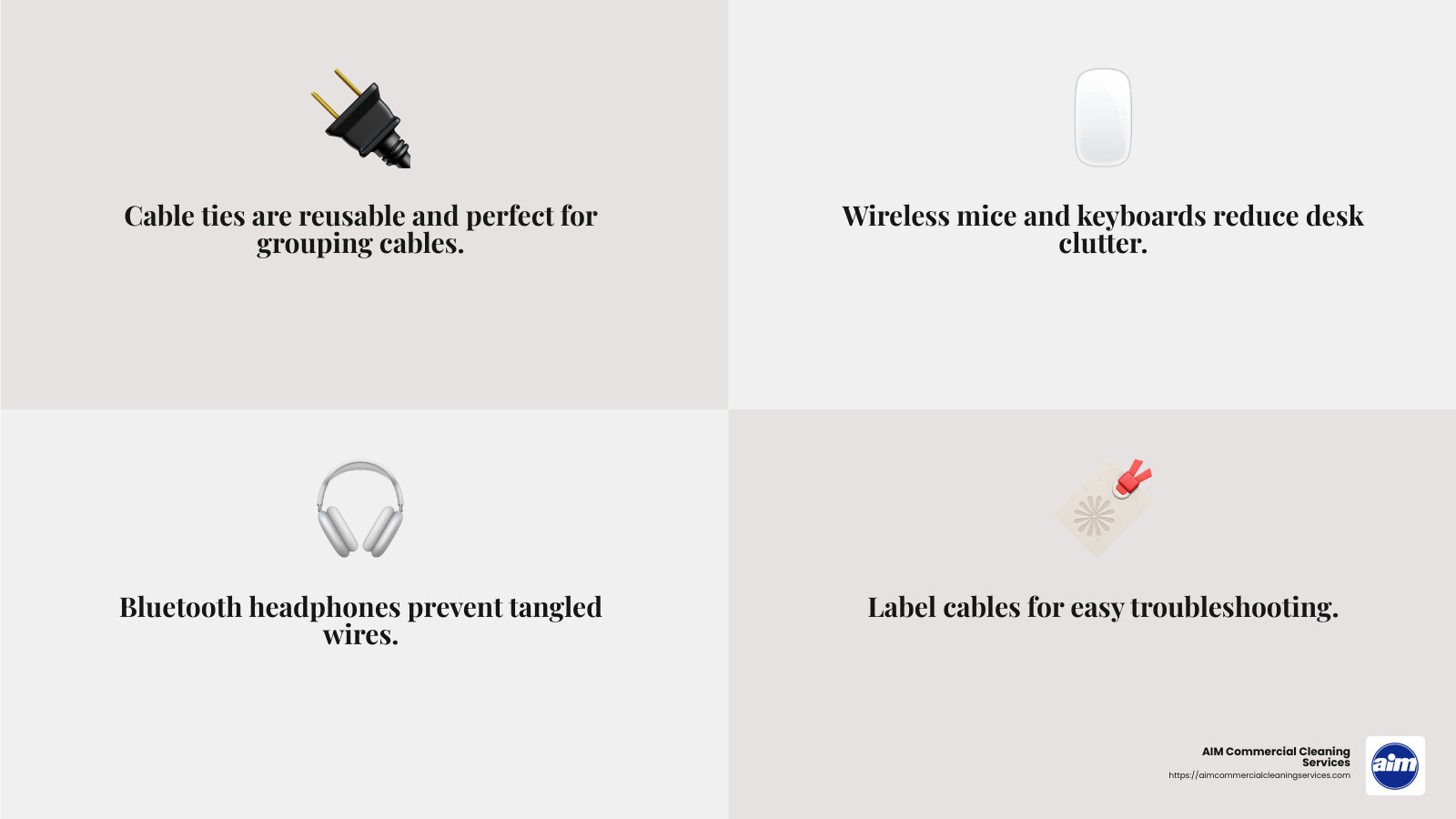
- Cable ties: These are perfect for grouping multiple cables together. Opt for reusable ones to make adjustments easy.
- Cable clips: Attach these to the edge of your desk to guide and hold cables in place, preventing them from slipping to the floor.
- Cable sleeves: These are ideal for bundling several cables into one neat package. They also protect the cables from wear and tear.
Wireless Devices
Switching to wireless devices can drastically reduce the number of cables on your desk. Consider upgrading to wireless versions of your most-used devices.
- Wireless mouse and keyboard: These eliminate the need for cords running across your desk, offering a cleaner look and more flexibility in positioning.
- Bluetooth headphones: Avoid tangled headphone wires by going wireless. They also offer the freedom to move around without being tethered to your desk.
- Wireless charging: If your devices support it, use wireless charging pads to cut down on charging cables.
Reduce Clutter
A clutter-free workspace is more inviting and easier to steer. By managing cables and wires, you can create a more organized and efficient environment.
- Label your cables: Use labels to identify each cable. This makes it easier to troubleshoot issues without unplugging the wrong device.
- Route cables strategically: Plan your cable routes to minimize visible clutter. Use the back of your desk or furniture to hide cables whenever possible.
- Invest in a surge protector: A surge protector with multiple outlets can help centralize your power sources and reduce the number of cords running to different outlets.
By implementing these strategies, you can minimize cable clutter and improve your workspace’s efficiency. A tidy desk not only looks professional but also helps you focus on your tasks without distractions.
Next, we’ll address some frequently asked questions about maintaining an efficient workspace.
Frequently Asked Questions about Workspace Efficiency
How do I keep my workspace clean and tidy?
Keeping your workspace clean and tidy involves a few simple but effective practices. Start with furniture that suits your needs. Choose pieces with built-in storage to minimize clutter. A tidy desk is essential for focus and productivity.
Posture is crucial for wellness. Ensure your chair and desk are at the right height to keep your back straight and your feet flat on the floor. This setup reduces strain and helps maintain a healthy posture throughout the day.
Establish a cleaning schedule. Daily habits, like wiping down surfaces and organizing papers, keep your space neat. High-touch areas, such as keyboards and phones, should be sanitized regularly to prevent the spread of germs.
How do you make an efficient workspace?
Efficiency in a workspace is about smart organization and regular maintenance. Conduct inspections to identify areas that need attention, like cluttered drawers or dusty shelves. Regular checks help maintain order and cleanliness.
Ergonomic furniture plays a key role. An adjustable chair and desk can improve comfort and reduce fatigue. Consider adding a footrest or wrist support to further improve ergonomics.
Incorporate greenery to boost mood and air quality. Plants like succulents or pothos are low-maintenance and add a refreshing touch to your workspace.
Noise reduction is also important. Use noise-canceling headphones or soft furnishings to absorb sound and create a quieter environment. This helps you concentrate better and reduces stress.
What are the best tips for a clean and efficient workspace?
To achieve a clean and efficient workspace, follow these best tips:
- Declutter regularly: Remove unnecessary items and organize your desk. Use dividers and shelves to keep things in order.
- Digital organization: Keep your files and emails organized. Use folders and naming conventions to quickly find what you need.
- Cable management: Use cable ties or clips to keep cords tidy. Wireless devices can also reduce cable clutter.
- Routine maintenance: Stick to a regular cleaning schedule to keep your space spotless. Address spills and messes immediately.
By implementing these strategies, you can maintain a workspace that supports productivity and well-being. A clean and organized environment helps you stay focused and efficient.
Next, we’ll explore how AIM Commercial Cleaning Services can assist in maintaining a professional and pristine office environment.
Conclusion
Maintaining a clean and efficient workspace is crucial for productivity and well-being. At AIM Commercial Cleaning Services, we understand the impact a pristine office environment can have on your business. Our professional cleaning solutions are designed to improve your workspace, ensuring it remains welcoming and productive.
Client satisfaction is at the heart of our services. We listen to your needs and customize our cleaning plans to fit your specific requirements. Whether it’s daily maintenance or specialized services, our team is equipped with the expertise and tools to handle it all. From dusting and vacuuming to deep cleaning and sanitization, we cover every aspect of commercial cleaning.
Our commitment to service excellence means you can trust us to deliver high-quality results consistently. We use environmentally friendly products and advanced cleaning techniques to create a safe and healthy environment for your employees and visitors. Plus, our flexible scheduling options ensure minimal disruption to your daily operations.
Investing in professional cleaning services not only keeps your office spotless but also boosts employee morale and efficiency. A well-maintained workspace reduces distractions, allowing your team to focus on what they do best.
If you’re in Eastern Massachusetts or Southern New Hampshire and looking for reliable commercial cleaning solutions, AIM Commercial Cleaning Services is here to help. Let us take care of the cleaning, so you can concentrate on running your business. Contact us today for a cleaner, healthier, and more inviting office environment.